

SmiKar Launches Forage for Squirrel, Bringing Archived SharePoint Content Back into Search, AI and Microsoft Copilot
News originally published by
EIN Presswire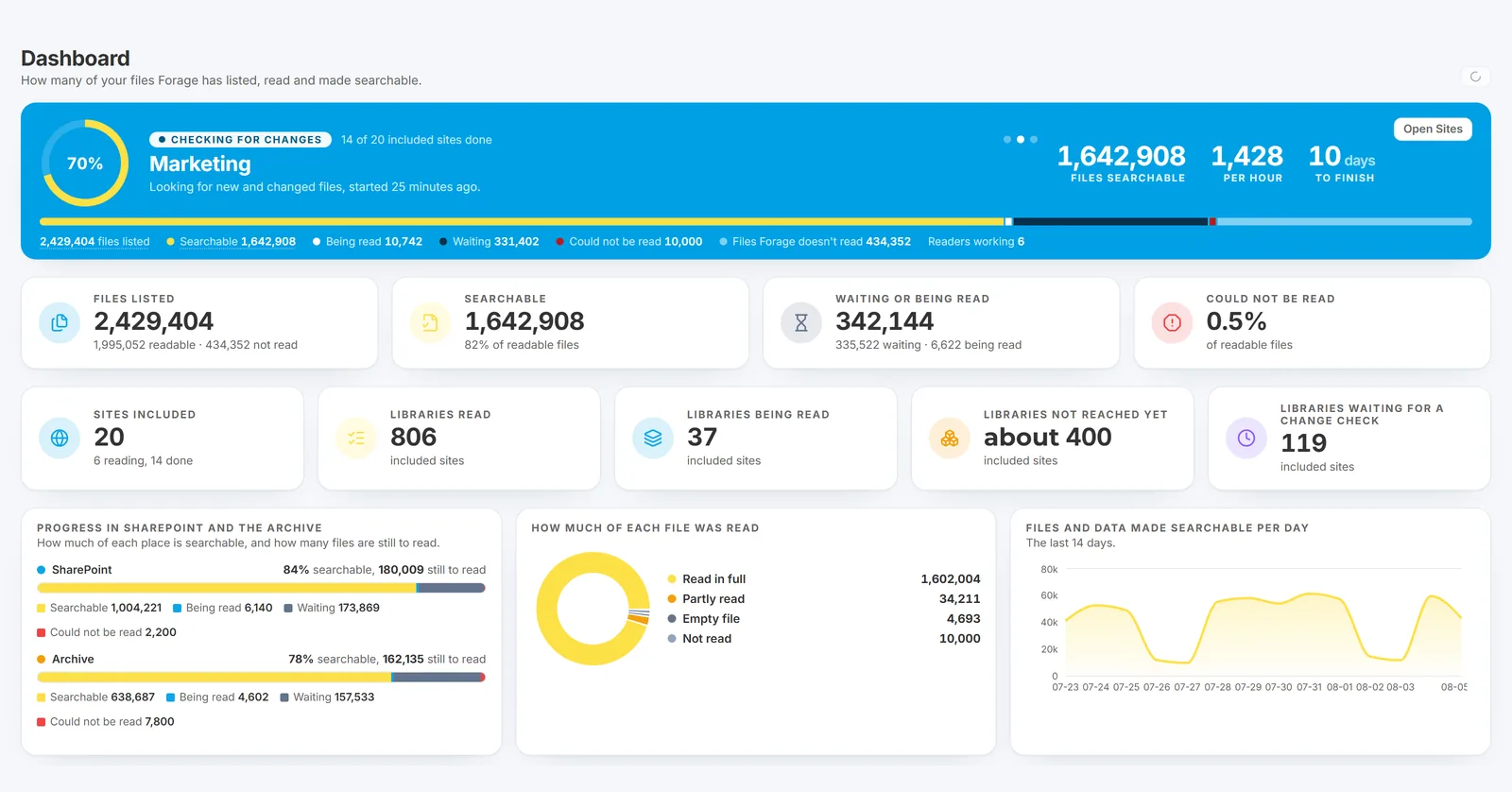
Forage Dashboard

An answer from the AI assistant. Each statement carries the number of the file it came from, and each cited file opens from the answer.

One search across live and archived content, with highlighted extracts and the labels on each file.

Files to Protect: files that look like the ones labelled Confidential but carry no label, listed for a person to review.

Content labels in Forage: how many files contain payment card numbers, bank details, passport numbers and other sensitive content.
Forage makes live and Squirrel-archived SharePoint content searchable in one place, finds sensitive content and answers questions with cited files.
SmiKar Software, developer of Squirrel, a **SharePoint Online archiving platform**, has announced **Forage for Squirrel**, a new capability that transforms how organisations discover, manage and interact with their SharePoint Online content, including documents archived to Azure Blob Storage.
Forage brings together live SharePoint documents and archived content into a single searchable environment. With full-text search, AI-powered question answering, automated content classification and Microsoft Copilot integration, organisations can gain greater visibility into their information while continuing to benefit from the storage savings delivered by Squirrel.
Traditionally, archiving has introduced a trade-off. Organisations reduce SharePoint storage costs by moving inactive documents into lower-cost Azure storage, but archived content becomes less accessible to enterprise search, compliance and AI tools.
**Forage removes that compromise.**
"Archiving shouldn't mean losing visibility of your information," said Mark Smith, Sales Director at SmiKar Software. "Squirrel helps organisations reduce SharePoint storage costs, while Forage ensures their archived content remains searchable, accessible and valuable. Together, they deliver a more complete approach to managing information across Microsoft 365."
## One Search Across Live and Archived SharePoint Content
Forage provides a unified search experience across SharePoint Online and the Squirrel archive, allowing organisations to discover information regardless of where it is stored.
Rather than relying solely on file names or metadata, Forage examines the actual contents of documents and builds a comprehensive, searchable index.
Supported content includes Microsoft Word, Excel and PowerPoint documents, PDFs, Outlook messages, OpenDocument files, CSV, HTML, XML and numerous other formats, including older Microsoft Office formats and macro-enabled documents.
Optical character recognition (OCR) extends these capabilities to scanned PDFs, images and embedded pictures within Office documents, making previously difficult-to-search information discoverable.
Search results include highlighted text extracts, document names and locations, file types, and available sensitivity and retention labels. Administrators can filter results to narrow their searches and locate relevant information quickly.
For example, an organisation can search for a contractual obligation and receive results from both an active SharePoint document and a contract archived several years earlier, without first restoring the archived file.
By combining Squirrel's **SharePoint archiving software** with Forage's search capabilities, organisations can continue optimising storage costs without losing access to the information contained within their archived documents.
## Ask Questions of Your Documents Using AI
Forage introduces AI-powered question answering, allowing authorised administrators to interact with organisational content using natural language.
Instead of manually searching through hundreds or thousands of documents, administrators can ask questions such as:
- What agreements do we have with a particular supplier?
- Which contracts contain specific termination conditions?
- What information do we hold about a particular project?
- Which documents reference a particular compliance requirement?
Forage searches relevant content, examines matching documents and generates an answer supported by citations to the original source files.
Each citation links directly to its supporting document, allowing administrators to verify the information and trace findings back to their source.
For more complex investigations, Forage can analyse thousands of matching files, consolidate the findings and produce a structured, referenced response.
Administrators can choose to analyse 1,000, 2,000, 5,000 or all matching documents. Larger investigations run in the background, allowing users to continue working while Forage processes the information.
Forage can also identify every document matching a particular search, presenting the results with file names, SharePoint sites, folder locations and modification dates. These results can be exported to CSV for further investigation.
Completed AI analyses can be delivered by email as PDF reports, including the supporting source documents.
Importantly, Forage's built-in AI operates within the customer's dedicated deployment, without sending document content to external AI services.
## Extend Microsoft Copilot to Archived SharePoint Content
As organisations expand their use of Microsoft Copilot, maintaining access to archived organisational knowledge becomes increasingly important.
**Forage for Copilot extends the information available to Microsoft Copilot beyond content stored directly in SharePoint Online.**
Through secure Microsoft authentication, Copilot can search and retrieve information from documents indexed by Forage, including content archived by Squirrel and scanned documents processed using OCR.
This allows employees to ask questions through Microsoft Copilot or Teams and receive answers informed by archived information that would otherwise be unavailable through standard SharePoint search.
Forage acts as the information retrieval layer, identifying relevant documents and supplying their text to Microsoft Copilot, which generates the response.
Access controls remain central to the integration. Employees authenticate using their own Microsoft accounts, and Forage verifies their SharePoint permissions before making document content available.
Records administrators can access the broader information inventory, while other employees are restricted to documents they are authorised to view.
Every search and document retrieval is recorded against the authenticated user, maintaining accountability and supporting auditing requirements.
For organisations investing in Microsoft Copilot, this integration helps ensure that valuable business knowledge remains accessible even after documents are archived.
## Automatically Discover and Classify Sensitive Information
Understanding what information an organisation holds is essential for effective governance, regulatory compliance and data protection.
Forage includes content classification capabilities that identify and categorise sensitive information across both live and archived SharePoint documents.
These capabilities can identify information such as:
- Personal and financial information
- Bank account and payment card details
- Tax and company identification numbers
- Passport and identity information
- Health-related information
- Contractual and commercially sensitive content
Classification uses configurable rules, text patterns, checksum validation and proximity detection to deliver consistent, explainable results.
Administrators can create, version, test and manage classification rules directly through the Squirrel portal.
Before enabling a rule, administrators can assess its potential impact, review sample matches and determine whether the classification criteria are appropriate.
Every classification finding includes supporting evidence from the document, allowing administrators to understand why a particular classification was assigned.
For records managers, compliance teams and data protection officers, this provides a clearer picture of where sensitive information exists throughout the organisation, regardless of whether the documents remain in SharePoint or have been archived.
## AI-Assisted Classification with Human Oversight
Forage also introduces AI-assisted classification to help organisations discover patterns and categories within their documents.
The AI can examine content across selected SharePoint sites and recommend classifications based on the types of information it discovers.
For example, it may identify collections of invoices, financial statements, technical reports, packing lists or contractual documents and suggest appropriate classification rules.
Each recommendation includes supporting information such as the number of matching documents, their locations, example files and suggested keywords.
**AI recommendations do not automatically change document classifications.** Administrators review the suggestions and decide which rules to enable.
Forage also helps identify potentially sensitive documents that may be missing appropriate Microsoft 365 sensitivity labels.
Through its Files to Protect capability, administrators can select an existing sensitivity label, such as Confidential, and identify documents containing similar information that currently have no label or a less restrictive classification.
Forage highlights these documents for review, allowing authorised personnel to determine whether additional protection is required.
"The goal isn't to replace human judgement with AI," Smith explained. "It's to give records and compliance teams the information they need to make better decisions, supported by evidence they can verify."
## Complete Visibility, Reporting and Auditability
Forage provides a central dashboard showing the progress and coverage of document indexing and classification across the organisation.
Administrators can monitor which SharePoint sites and documents have been processed, identify files that could not be read and understand the reasons for any exclusions or failures.
Unlike search systems that provide limited visibility into indexing coverage, Forage accounts for documents that have been successfully processed, excluded by policy or file type, or could not be indexed.
This allows organisations to understand how much of their information is searchable and identify gaps that may require attention.
Detailed reporting provides visibility into:
- Document indexing and search coverage
- Sensitive information discovered
- Classification and sensitivity labels
- Documents excluded from processing
- Processing failures and outstanding issues
- Search activity and administrative actions
Reports can be exported to PDF or spreadsheet formats and distributed automatically to relevant stakeholders.
Forage also maintains a tamper-resistant audit trail covering administrative changes, classification rules, searches, document access and exports.
These records support governance, internal investigations and regulatory compliance requirements by providing a traceable history of activity within the platform.
## Designed for Security, Privacy and Data Sovereignty
Forage is designed around the same customer-focused principles as Squirrel, with an emphasis on security, information ownership and control.
Each customer operates within a dedicated Forage deployment, with separate databases and search indexes to maintain data isolation.
Archived documents remain in the customer's Azure Blob Storage, while document processing and AI analysis take place within the dedicated Forage environment.
Document content is not transmitted to external AI services for processing by Forage's built-in AI.
Forage also leverages the existing information maintained by Squirrel, minimising unnecessary SharePoint activity and avoiding the need to repeatedly crawl the entire environment.
Changes to documents are detected and processed incrementally, keeping the search index current without modifying source files.
This architecture enables organisations to extend search and AI capabilities across their information while maintaining control over where that information is stored and processed.
## Built for Records Management, Compliance and Microsoft 365 Teams
Forage is designed for organisations managing large volumes of SharePoint content, particularly those balancing storage optimisation with growing governance, compliance and AI requirements.
For records managers, it provides greater visibility into organisational information and the ability to locate content across both active and archived repositories.
For compliance and data protection teams, it simplifies the discovery and classification of sensitive information while providing detailed reporting and auditability.
For Microsoft 365 administrators, it extends the usefulness of archived information without increasing SharePoint storage consumption.
And for organisations investing in artificial intelligence, it helps ensure that valuable institutional knowledge remains accessible and available for analysis, even after documents have been archived.
By extending the capabilities of Squirrel's **SharePoint Online archiving platform**, Forage enables organisations to approach archiving as part of a broader information management strategy rather than simply a storage reduction exercise.
## Available Within Squirrel
Forage is integrated directly into the Squirrel web portal, alongside the existing Archive and Security capabilities.
There is no separate application for administrators to access, allowing organisations already using Squirrel to extend their existing platform with advanced search, AI and classification functionality.
With Squirrel managing the secure archiving and restoration of SharePoint content and Forage providing the intelligence to search, understand and classify that information, organisations gain a more comprehensive solution for managing their Microsoft 365 data.
Forage is available to organisations using Squirrel.
To learn more or arrange a demonstration, contact SmiKar Software at **https://www.smikar.com**.
## About SmiKar Software
Founded in 2015, SmiKar Software develops **SharePoint archiving software** and information management solutions that help organisations optimise, manage and protect their Microsoft 365 environments.
Its flagship product, **Squirrel**, is a **SharePoint Online archiving platform** designed to reduce SharePoint Online storage costs by securely moving inactive documents to Azure Blob Storage within the customer's own Azure subscription.
Squirrel preserves access to archived information through self-service restoration, allowing documents to be returned to their original SharePoint locations when required.
Beyond archiving, the Squirrel platform offers AI summarisation, security monitoring and advanced information management through Forage, enabling organisations to search, classify and analyse both live and archived SharePoint content.
SmiKar Software is a Microsoft Partner serving organisations worldwide, with Squirrel available through the Microsoft Azure Marketplace.
Mark smith
SmiKar
0420983957
Visit us on social media:
LinkedIn
Facebook
Legal Disclaimer:
EIN Presswire provides this news content "as is" without warranty of any kind. We do not accept any responsibility or liability for the accuracy, content, images, videos, licenses, completeness, legality, or reliability of the information contained in this article. If you have any complaints or copyright issues related to this article, kindly contact the author above.
